

wpForo actions let a Zaplane workflow do work in your forum for you. Post a reply, close a solved topic, move a topic, ban a spammer, or move a member to a new usergroup, all without opening wpForo.
This page covers all 34 wpForo actions and the fields each one needs.
Before you start: wpForo must be installed and active on the same WordPress site as Zaplane. If it is not active, the action stops with the error “wpForo is not active.” (Checked with wpForo 3.2.4.)
Add a wpForo action
This example replies to a forum topic. The same steps work for every wpForo action.
Step 1: Create a workflow and set up a trigger
Before adding a wpForo action, you need to set up a trigger first. Here is how to do it quickly:
Go to Zaplane > Workflows in your WordPress dashboard, then click Create New Workflow to open the workflow editor.
You need a saved trigger before you can add an action. For wpForo events as a trigger, see wpForo triggers.
Step 2: Add an action
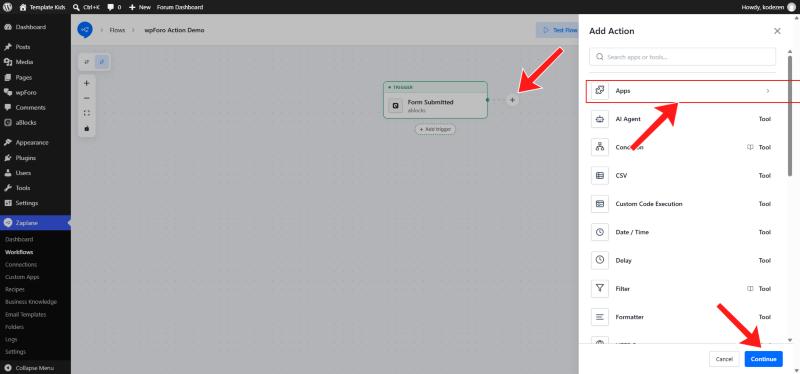
Click the + button next to your trigger, then select Apps in the Add Action panel.
Step 3: Select the wpForo app
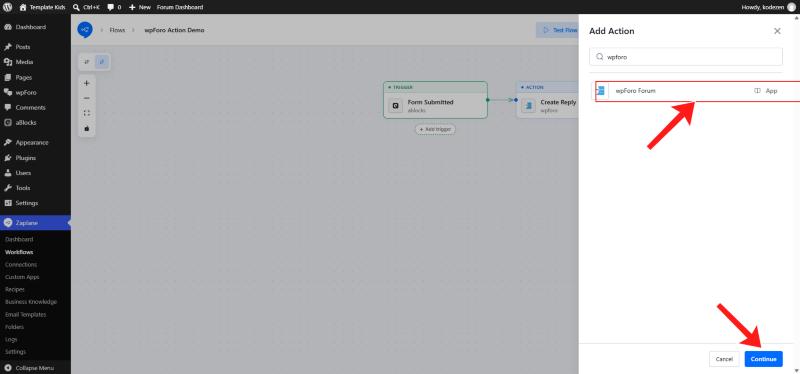
Search for wpForo, select wpForo Forum, then click Continue.
Step 4: Choose the action type
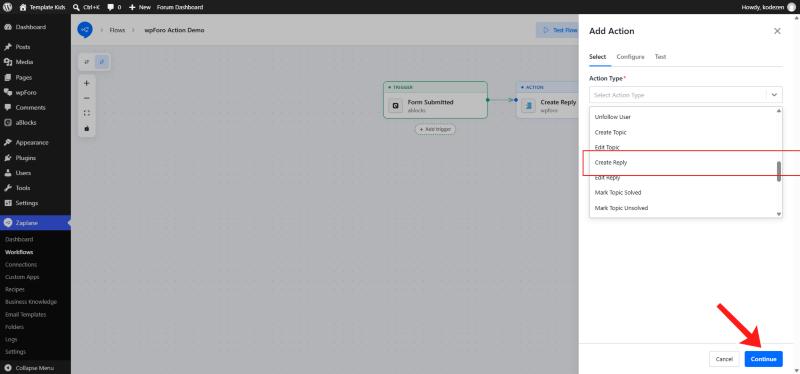
Open the Action Type list and select the action you want, here Create Reply. Then click Continue. See All wpForo actions for the full list.
Step 5: Configure the action
On the Configure tab, fill in the three required fields, then click Continue:
@ to insert dynamic data.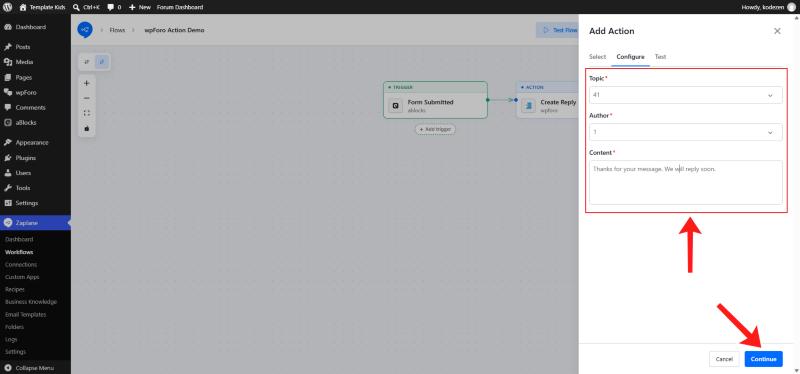
Step 6: Test the action
On the Test tab, click Test Action to run the action once. The Output shows the result. For Create Reply it returns the new post_id, plus the topic_id and user_id. If it works, click Save.
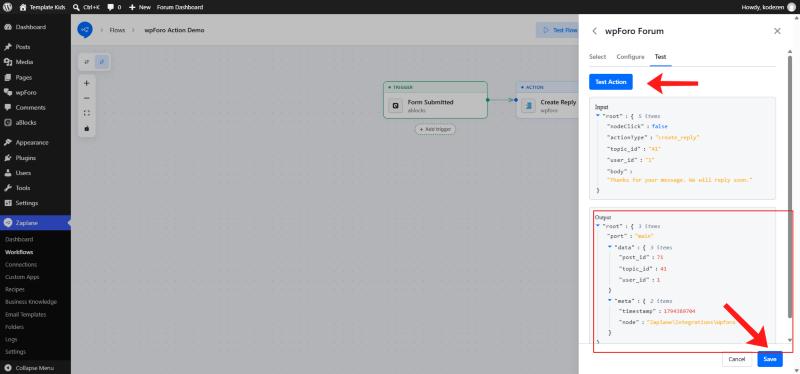
Heads up: Test Action runs for real. Testing Create Reply posts an actual reply in your forum.
Step 7: Update and activate the workflow
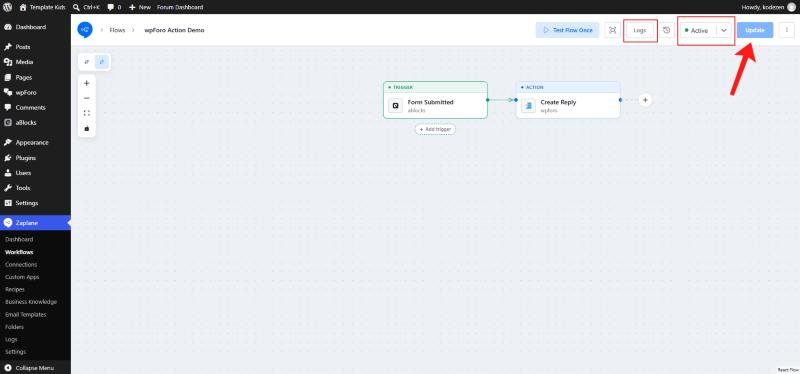
Back on the canvas, open the status list and choose Active, then click Update to save your workflow.
Every time your trigger fires, Zaplane now runs the wpForo action.
All wpForo actions
Fields marked required must be filled in. Topic, user, forum and usergroup fields are lists you pick from. The Reply ID field is plain text, so paste an ID or insert dynamic data.
Create and edit content
|
Action |
What it does |
Fields |
|
Create Topic |
Posts a new topic |
Forum*, Author*, Title*, Content*, Tags (comma separated) |
|
Edit Topic |
Changes a topic’s title or content |
Topic*, Edit As (defaults to the topic author), New Title, New Content. Give at least one of title or content |
|
Create Reply |
Posts a reply |
Topic*, Author*, Content* |
|
Edit Reply |
Changes a reply’s content |
Reply ID*, Edit As (defaults to the reply author), New Content* |
Create and edit actions run as the user you choose, so wpForo applies that user’s permissions. If wpForo refuses, the action fails and includes wpForo’s reason in the error.
Moderate topics
|
Action |
What it does |
Fields |
|
Close Topic |
Closes a topic |
Topic* |
|
Re-open Topic |
Opens a closed topic |
Topic* |
|
Approve Topic |
Approves a pending topic |
Topic* |
|
Unapprove Topic |
Sets a topic back to unapproved |
Topic* |
|
Make Topic Private |
Marks a topic private |
Topic* |
|
Make Topic Public |
Makes a private topic public |
Topic* |
|
Move Topic to Forum |
Moves a topic to another forum |
Topic*, Forum* |
|
Merge Topics |
Merges the source topic into the target topic |
Target Topic* (keeps the posts), Source Topic* (merged into target). Pick two different topics |
|
Delete Topic |
Deletes a topic |
Topic* |
|
Mark Topic Solved |
Marks a topic solved |
Topic* |
|
Mark Topic Unsolved |
Removes the solved mark |
Topic* |
Moderate replies
|
Action |
What it does |
Fields |
|
Approve Reply |
Approves a pending reply |
Reply ID* |
|
Unapprove Reply |
Sets a reply back to unapproved |
Reply ID* |
|
Mark Reply as Answer |
Marks a reply as the answer (also marks its topic solved) |
Reply ID* |
|
Unmark Reply as Answer |
Removes the answer mark (also marks its topic unsolved) |
Reply ID* |
|
Delete Reply |
Deletes a reply |
Reply ID* |
Votes, likes and bookmarks
|
Action |
What it does |
Fields |
|
Vote on Post (Up/Down) |
Casts a vote as a user |
Reply ID*, Voter*, Vote* (Up or Down) |
|
Like Post |
Adds a like as a user |
Reply ID*, User* |
|
Bookmark Topic |
Bookmarks a topic for a user |
Topic*, User* |
|
Remove Topic Bookmark |
Removes a user’s bookmark |
Topic*, User* |
A user has one reaction per post. A new vote or like replaces the earlier one. If the topic is already bookmarked, Bookmark Topic returns success and does nothing.
Members
|
Action |
What it does |
Fields |
|
Ban Forum User |
Bans a user |
User* |
|
Unban Forum User |
Lifts a ban |
User* |
|
Activate Forum User |
Activates a user |
User* |
|
Deactivate Forum User |
Deactivates a user |
User* |
|
Change User Usergroup |
Moves a user to a usergroup |
User*, Usergroup* |
|
Follow User |
Makes one user follow another |
User*, User to Follow / Unfollow* (must be two different users) |
|
Unfollow User |
Makes one user unfollow another |
User*, User to Follow / Unfollow* |
Forums and usergroups
|
Action |
What it does |
Fields |
|
Create Forum |
Creates a forum under a category or forum |
Forum Title*, Description, Parent Category / Forum* |
|
Delete Forum |
Deletes a forum |
Forum* |
|
Create Usergroup |
Creates a usergroup |
Usergroup Name*, Description |
Create Forum needs a parent. A top-level item in wpForo is a category and cannot hold topics, so the new forum always sits under an existing category or forum.
Tips and limits
topic_topicid into Topic.