

A member posts a topic. An admin bans someone. A reply gets marked as the answer. Any of these can start a Zaplane workflow.
There are 39 wpForo triggers, listed below with the data they hand to your next step.
Before you start: wpForo must be installed and active on the same WordPress site as Zaplane. (Checked with wpForo 3.2.4.)
Set up a wpForo trigger
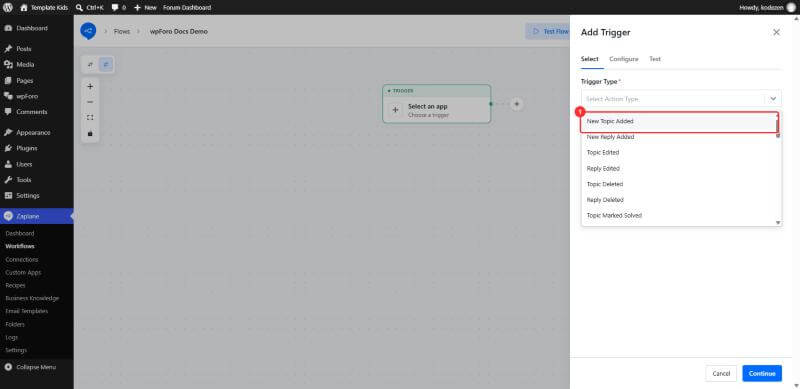
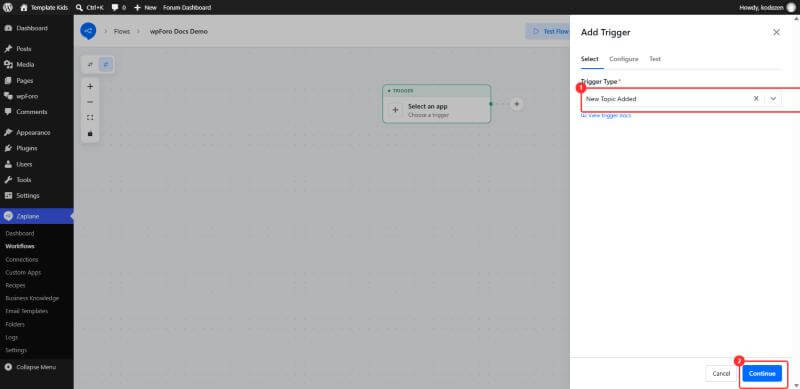
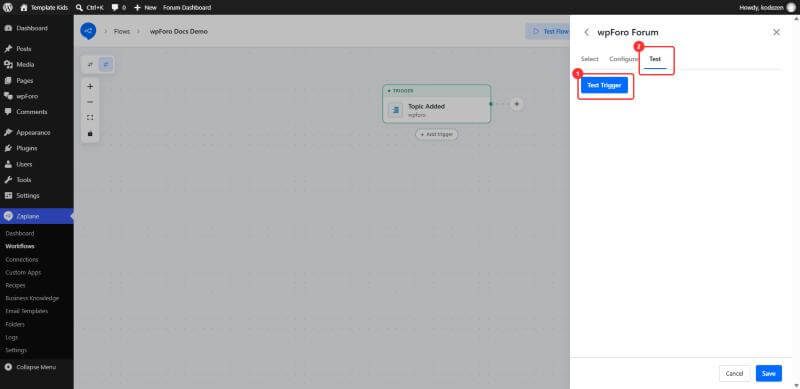
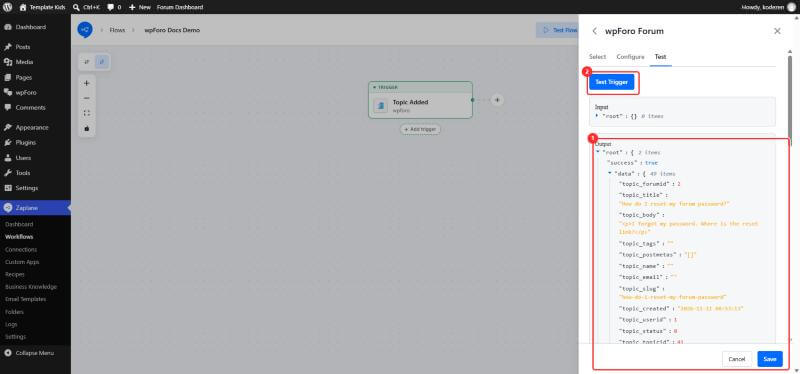
Everything in Output is available to later steps. Prefixes such as topic_, forum_ and author_ tell you where a field comes from.
All wpForo triggers
Topics
|
Trigger |
Starts when |
|
New Topic Added |
A topic is created |
|
Topic Edited |
A topic is edited |
|
Topic Deleted |
A topic is deleted |
|
Topic Marked Solved |
A topic is marked solved |
|
Topic Marked Unsolved |
A topic is marked unsolved |
|
Topic Closed |
A topic is closed |
|
Topic Re-opened |
A closed topic is opened again |
|
Topic Approved |
A pending topic is approved |
|
Topic Unapproved |
A topic is set back to unapproved |
|
Topic Privacy Changed |
A topic is made private or public |
|
Topic Moved to Another Forum |
A topic is moved to a different forum |
|
Topics Merged |
Two topics are merged |
Replies
|
Trigger |
Starts when |
|
New Reply Added |
A reply is posted |
|
Reply Edited |
A reply is edited |
|
Reply Deleted |
A reply is deleted |
|
Reply Approved |
A pending reply is approved |
|
Reply Unapproved |
A reply is set back to unapproved |
|
Reply Marked as Answer |
A reply is marked as the answer (also fires when the mark is removed) |
Votes, reactions and reports
|
Trigger |
Starts when |
|
Post Voted (Up/Down) |
A member votes a post up or down |
|
Post Liked/Reacted |
A member likes or reacts to a post |
|
Post Reported |
A member reports a post |
Members
|
Trigger |
Starts when |
|
Forum User Registered |
A member registers on the forum |
|
Forum Profile Updated |
A member updates their forum profile |
|
Forum User Banned |
A user is banned |
|
Forum User Unbanned |
A user is unbanned |
|
Forum User Activated |
A user is activated |
|
Forum User Deactivated |
A user is deactivated |
|
Forum User Deleted |
A forum user is deleted |
|
User Usergroup Changed |
A user is moved to another usergroup |
|
User Followed Someone |
A member follows another member |
|
User Unfollowed Someone |
A member unfollows another member |
|
Topic Bookmarked |
A member bookmarks a topic |
|
Bookmark Removed |
A member removes a bookmark |
Forums and usergroups
|
Trigger |
Starts when |
|
Forum Created |
A forum is created |
|
Forum Deleted |
A forum is deleted |
|
Usergroup Created |
A usergroup is created |
AI moderation
These fire from wpForo’s own AI moderation, so they only run if that feature is active on your site.
|
Trigger |
Starts when |
|
AI Moderation: User Warned |
AI moderation warns a user |
|
AI Moderation: User Banned |
AI moderation bans a user |
|
AI Moderation: User Suspended |
AI moderation suspends a user |
Data each trigger returns
Field names combine a prefix with a wpForo field name. In the New Topic Added test above, the output included topic_title, topic_body, topic_slug, topic_forumid and topic_userid.
|
Prefix |
What it holds |
Used by |
|
|
The topic’s wpForo fields |
Most topic and reply triggers |
|
|
The reply’s wpForo fields |
Reply, vote, reaction and bookmark triggers |
|
|
The forum’s wpForo fields |
New Topic, New Reply, Topic Edited, Reply Edited and similar |
|
|
The author’s |
Topic and reply triggers |
|
|
The affected member |
Member triggers (register, ban, activate, usergroup) |
Some triggers add their own fields:
|
Trigger |
Extra fields |
|
Reply Marked as Answer |
|
|
Post Voted (Up/Down) |
|
|
Post Liked/Reacted |
|
|
Post Reported |
|
|
Topic Moved to Another Forum |
|
|
Topics Merged |
|
|
Topic Privacy Changed |
|
|
User Usergroup Changed |
|
|
Forum User Banned / Unbanned / Activated / Deactivated |
|
|
AI Moderation triggers |
|
Tips and limits
answer_status in a condition step.